It seems a lot of people on here are able to run their game to look good at an decent fps. What are your guy's settings and configs?
Tf2 Settings/Configs
-
LubricatedLarry


- Galley Rat
- Posts: 11
- Joined: Mon Feb 09, 2026 1:02 pm






Re: Tf2 Settings/Configs
Just use Mastercomfig High, and change the stupid default setting that disables sprays.
- Screenshot 2026-02-25 234038.png (385.27 KiB) Viewed 1794 times
Outside of that one setting it's pretty close to TF2 defaults and runs noticeably better (At least for me.)
-
EricZhang456


- Galley Rat
- Posts: 7
- Joined: Sat Feb 07, 2026 3:27 am

Re: Tf2 Settings/Configs
Some of these are broken, I am pretty sure new impact effects don't do anything and CSAA has been removed on new Nvidia graphics cards
-
Buchou

- Galley Rat
- Posts: 40
- Joined: Sun Feb 08, 2026 6:03 pm
- Location: Castaway.tf Virginia 1
- Contact:

Re: Tf2 Settings/Configs
I am a big believer in default viewmodel FOV and not using minimized viewmodels. Fucking with the viewmodel FOV especially with the min models is horrendously ugly and doesn't give you any edge in practice.

Long live Castaway! Long live Castaway!



-
goodBoyLegacy


- Galley Rat
- Posts: 4
- Joined: Tue May 05, 2026 2:11 pm
- Location: Eighth Circle of Hell

Re: Tf2 Settings/Configs
I run tf2 video configs on the highest possible. Mastercomfigs is only acceptable if your pc sucks dick and can't, somehow, run tf2, or runs it really poorly. If you use it just to get 3 extra fps, then you just got mind raped by compies who say that 120 fps > 125 fps is a big difference.
Aside from that, I use tf_use_min_viewmodels 1, viewmodel_fov 81 and a mod that makes your viewmodel centered like Quake.



Re: Tf2 Settings/Configs
fov_desired 90
viewmodel_fov 82.5
regular viewmodels, not minimal
tf_use_match_hud 0
cl_autoreload 0
tf_simple_disguise_menu 1 (this is really helpful on spy. would recommend.)
tf_medigun_autoheal 1 (i don't play that much medic, but i prefer not to hold the mouse button down when i do)
actual video settings are basically the highest they can go, including mat_picmip -10 and full ragdolls. you don't need mastercoms if you can type commands into an autoexec file
connection settings:
cl_interp 0
cl_interp_ratio 2
cl_cmdrate 66
cl_updaterate 66
rate 100000
I, K, and M are all loadout binds for loadout slots 1, 2, and 3 respectively
the 2 side mouse buttons are for building sentries and dispensers, left shift is for building tele exits and V is for building entrances
f1-f4 are for destroying buildings
i also have cl_allowdownload 1 on, however i will probably turn it off soon when i do my semi-regular spray purge. see this video i made to learn what that means.
scripts:
bind del "record fix; stop" - for fixing invisible players
bind [ "snd_restart; hud_reloadscheme" - useful
bind t "say_party" (useful if playing Boot Camp MvM, the one valve matchmaking mode i'm alright with playing)
alias +extrainfo "net_graph 4; cl_showpos 1"
alias -extrainfo "net_graph 0; cl_showpos 0"
bind n +extrainfo




Re: Tf2 Settings/Configs
Autoexec:
Code: Select all
cl_disablehtmlmotd 0
tf_hud_target_id_disable_floating_health 0
tf_respawn_on_loadoutchanges 1
tf_use_match_hud 0

cl_cmdrate 67
cl_lagcompensation 1
cl_pred_optimize 2
cl_smooth 0
cl_smoothtime 0.01
cl_updaterate 67
rate 80000
cl_interp 0
cl_interp_ratio 1

alias stry"cmd destroy 2 0;cmd build 2 0"
alias disp"cmd destroy 0 0;cmd build 0 0"
alias entr"cmd destroy 1 0;cmd build 1 0"
alias exitt"cmd destroy 1 1;cmd build 1 1"
bind f1 stry
bind f2 disp
bind f3 entr
bind f4 exitt
My network settings I just found through some online searching I don't know if they're correct or ideal.
Engineer binds are helpful, you can build a building with a single button and it will destroy the building you had placed previously. Nice for moving teleporters or just quick destroying things. The destroy cmd also works while you're dead, helpful for destroying teleporters being camped if you see it while in the dead spectate cam. Notably an issue in mvm because f4 is hardcoded to ready you up, which is why I have a separate f5 bind to toggle ready up for when I rarely play mvm.
Binds:
Code: Select all
bind "KP_END" "load_itempreset 0"
bind "KP_DOWNARROW" "load_itempreset 1"
bind "MOUSE3" "+use"
bind "MOUSE4" "+use_action_slot_item"
bind "MWHEELUP" "+jump"
bind "MWHEELDOWN" "+jump"
bind "-" "explode"
bind "=" "kill"
bind "[" "impulse 101"
bind "]" "noclip; sm_noclip @me"
Jump bind is an old habit from when I used to spend a lot of time on a server with a bhop plugin. I swap weapons with the number keys
Mouse:
Code: Select all
Sensitivity: 1.80
Acceleration: Off
Reverse: Off
Filter: Off
Graphics:
Code: Select all
Model Detail: Medium
Texture Detail: High
Shader Detail: High
Water Detail: Simple Reflections
Shadow Detail: Medium
Color Correction: Enabled
Advanced settings
Code: Select all
Auto reload: On
Hitsound: Quake hitsounds
Spy: Concise Disguise Menu
Sniper re-zoom: Off
Medic: Keep Beam
Glow effect: Off
Teammate glow after respawn: Off
Player model in class HUD: Off
Viewmodel FOV: 54
I don't use mastercoms anymore
Oh, they never lie. They dissemble, evade, prevaricate, confound, confuse, distract, obscure, subtly misrepresent and willfully misunderstand with what often appears to be a positively gleeful relish and are generally perfectly capable of contriving to give one an utterly unambiguous impression of their future course of action while in fact intending to do exactly the opposite, but they never lie. Perish the thought.
Re: Tf2 Settings/Configs
heres my autoexec.cfg
Code: Select all
// disables first person flames
bind 1          eq_slot1
bind 2          eq_slot2
bind 3          eq_slot3

alias set_slot1   "viewmodel_fov 1"
alias set_slot2   "viewmodel_fov 90"
alias set_slot3   "viewmodel_fov 90"


alias eq_slot1 "slot1; set_slot1; alias eq_invnext eq_slot2; alias eq_invprev eq_slot3; qs_slot1; alias set_lastinv alias eq_lastinv eq_slot1; alias qs_slot1 ;         alias qs_slot2 set_lastinv; alias qs_slot3 set_lastinv"
alias eq_slot2 "slot2; set_slot2; alias eq_invnext eq_slot3; alias eq_invprev eq_slot1; qs_slot2; alias set_lastinv alias eq_lastinv eq_slot2; alias qs_slot1 set_lastinv; alias qs_slot2 ;         alias qs_slot3 set_lastinv"
alias eq_slot3 "slot3; set_slot3; alias eq_invnext eq_slot1; alias eq_invprev eq_slot2; qs_slot3; alias set_lastinv alias eq_lastinv eq_slot3; alias qs_slot1 set_lastinv; alias qs_slot2 set_lastinv; alias qs_slot3"

eq_slot1
alias eq_lastinv   eq_slot2
r_drawviewmodel 1

r_lightmap_bicubic 0
r_radialfog_force 0
mat_picmip -1
tf_contract_progress_show 0

snd_mixahead 0.02
I didn't make this I just found it online!
if you're wanting to add this to your game change the set_slot2 and set_slot3 viewmodel fov value to whatever you usually use.
add the flame removing thing at your own risk since I want to be the only one with access to it.
demonstration:
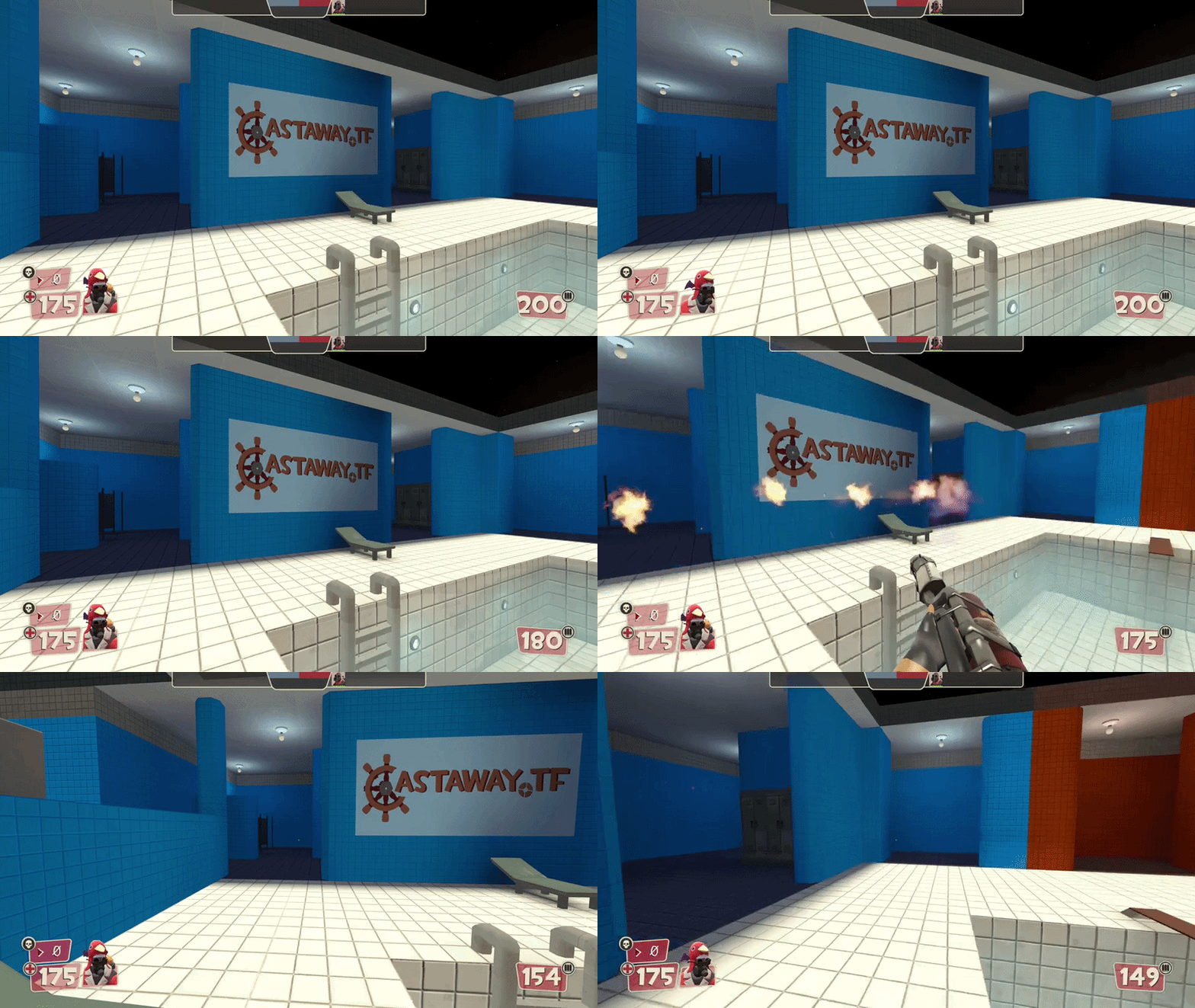
(look at the ammo)